 Parallel
Parking: from luck to good odds.
Every street in the city has a rhythm. Parallel gives you the odds of finding a spot, for every street in Montréal, before you drive there.

free to use · paid tier available · no account required
Featured in the City of Montréal open data showcase89 %
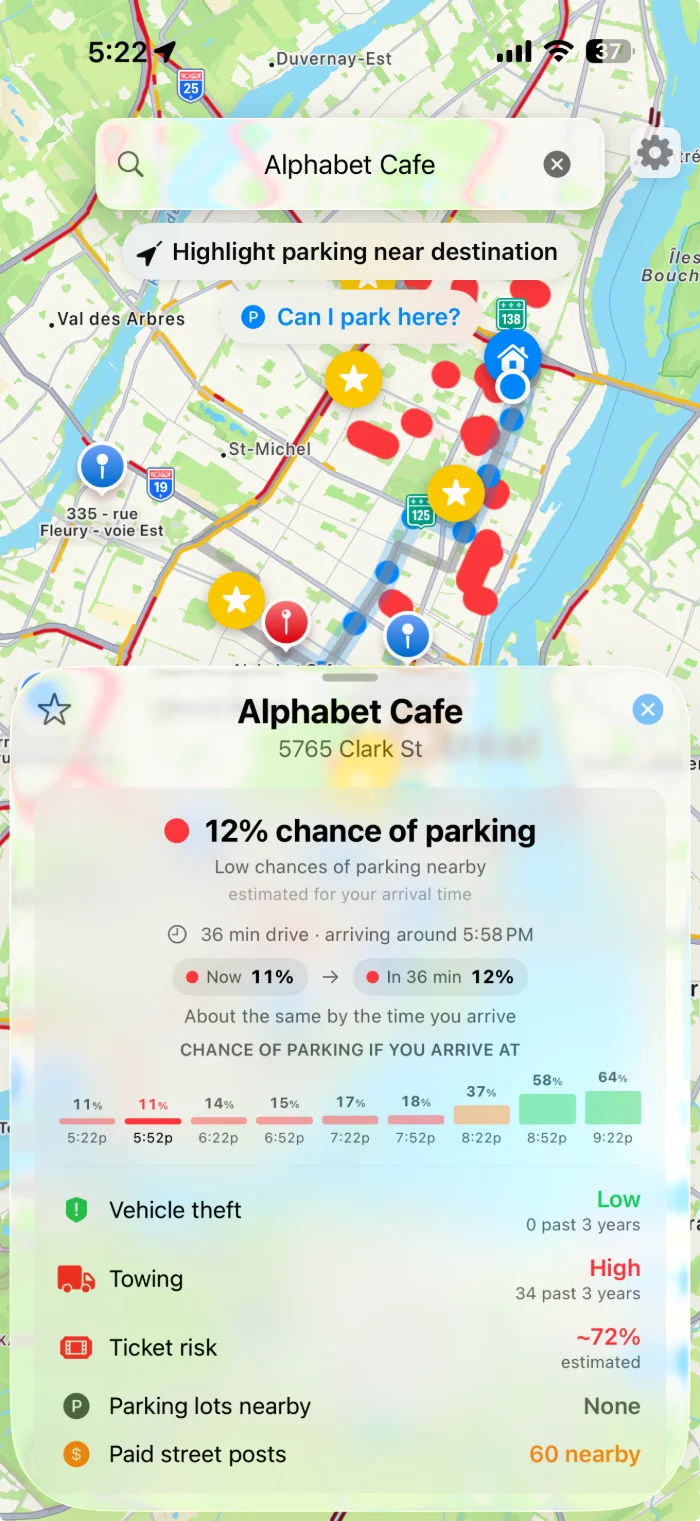
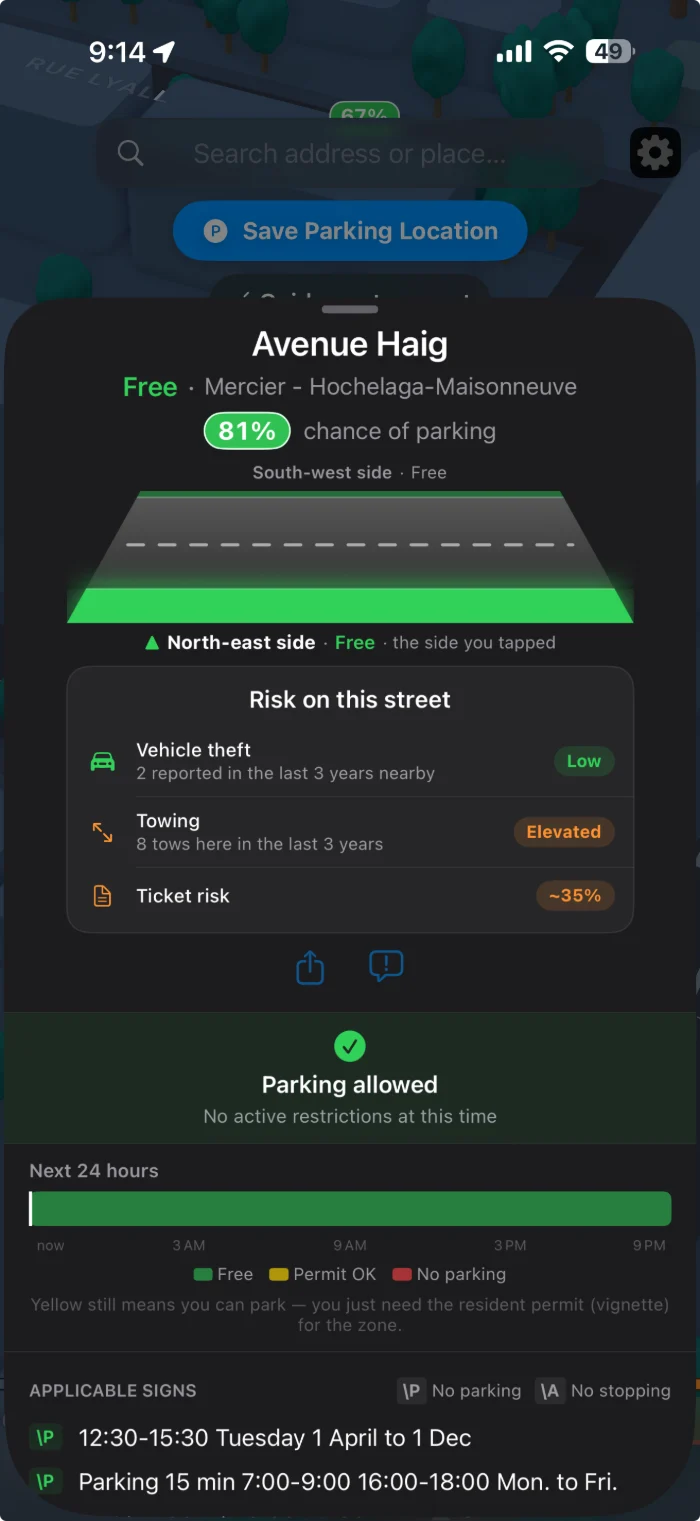
Chance of parking on Avenue Haig, parking allowed
Vehicle theft
Low
0 past 3 years
Nearby
Screen shows features from Parallel Plus.
Towing
Elevated
11 past 3 years
Collisions
Low
2 past 3 years
Ticket risk
~58 %
estimated
Chance if you arrive at
Your chances, drawn on the street.
Same destination, same drive. Know what is waiting for you on the street when you get there, and you will not look back.
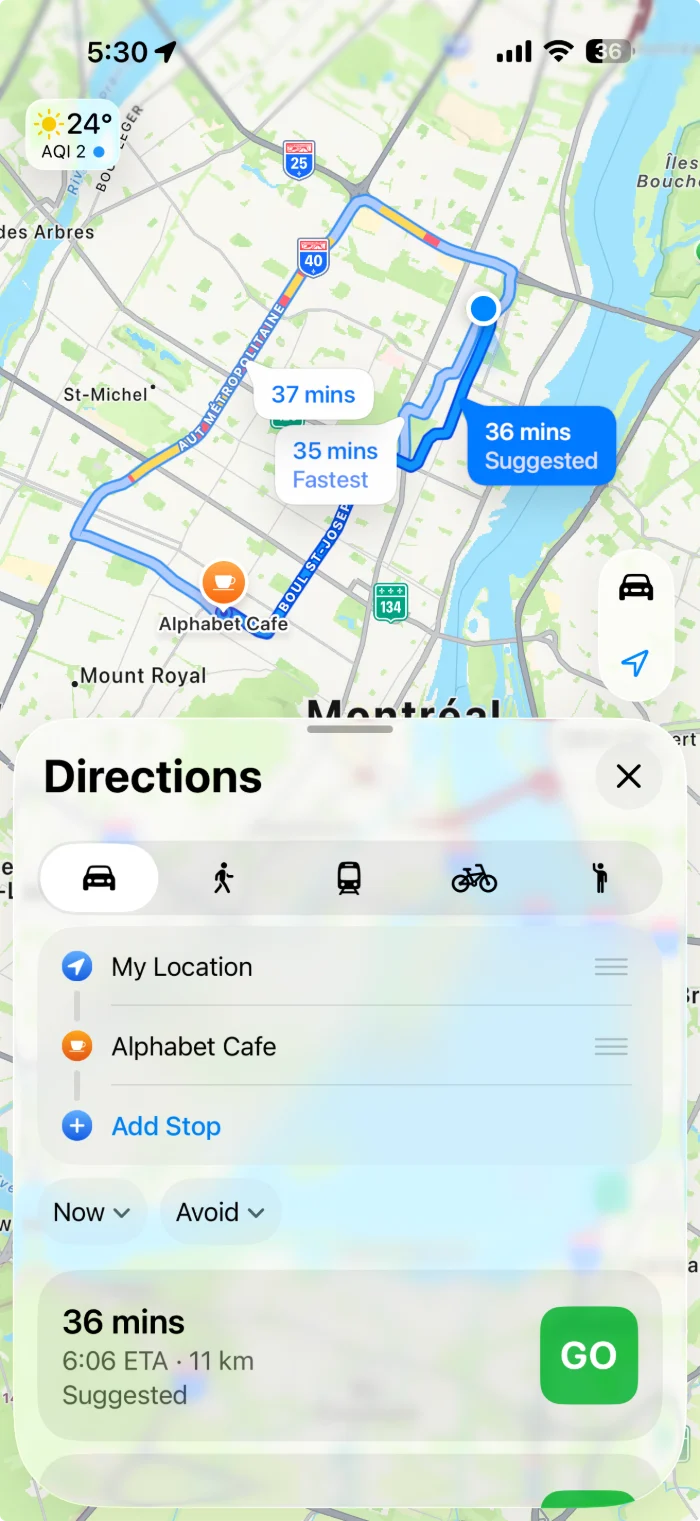
How you'll use it.
01
Open it
Your streets, coloured by their parking regulations: red where you can't park, amber where you need a permit, plain where you can.* No account, no setup.
02
See your chances
Type in where you're going and Parallel tells you how likely you are to find a spot when you arrive. Or just drive, and watch the map change around you, on your phone or on CarPlay.
03
Try the odds and park
Take a spot on a street where parking is allowed. Before you walk away, scan the sign on the pole and Parallel reads it back to you. It also remembers where you left the car.
* The city does not publish perfectly accurate locations for its street signs, and changes do not always reach the app the same day. The sign on the pole is what the parking officer reads, so it always wins.
Thirteen features to the same question.
Parallel is free to use, and the paid version helps us keep it that way. Those features carry a Parallel Plus Feature tag.
01
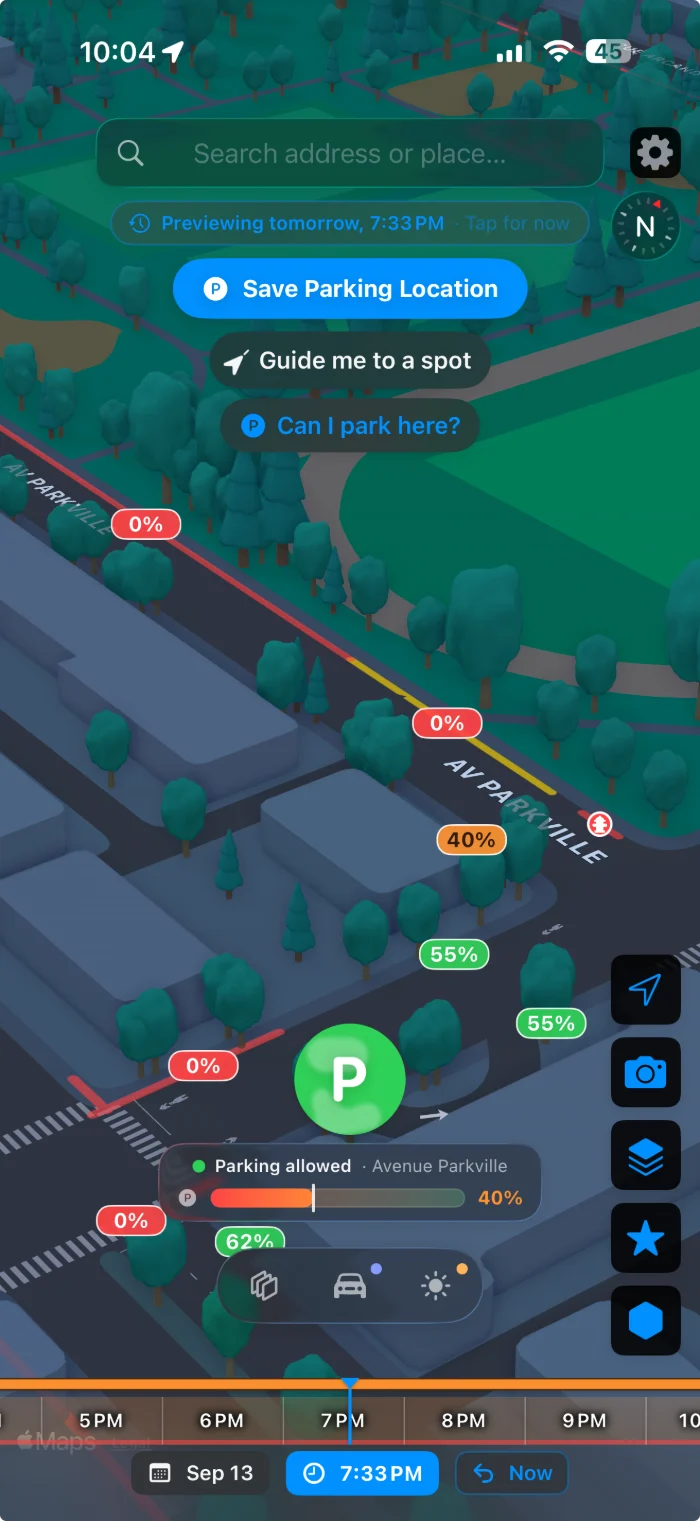
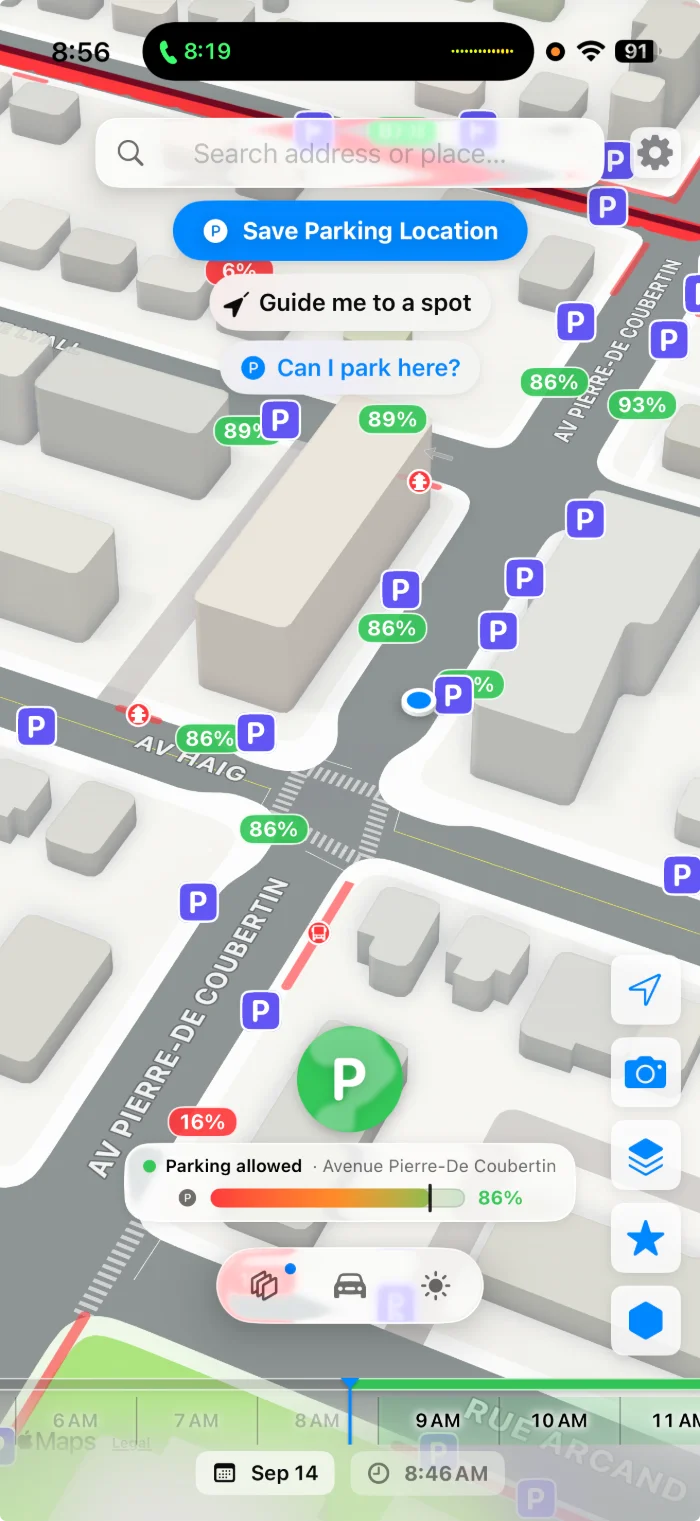
Your chances, street by street
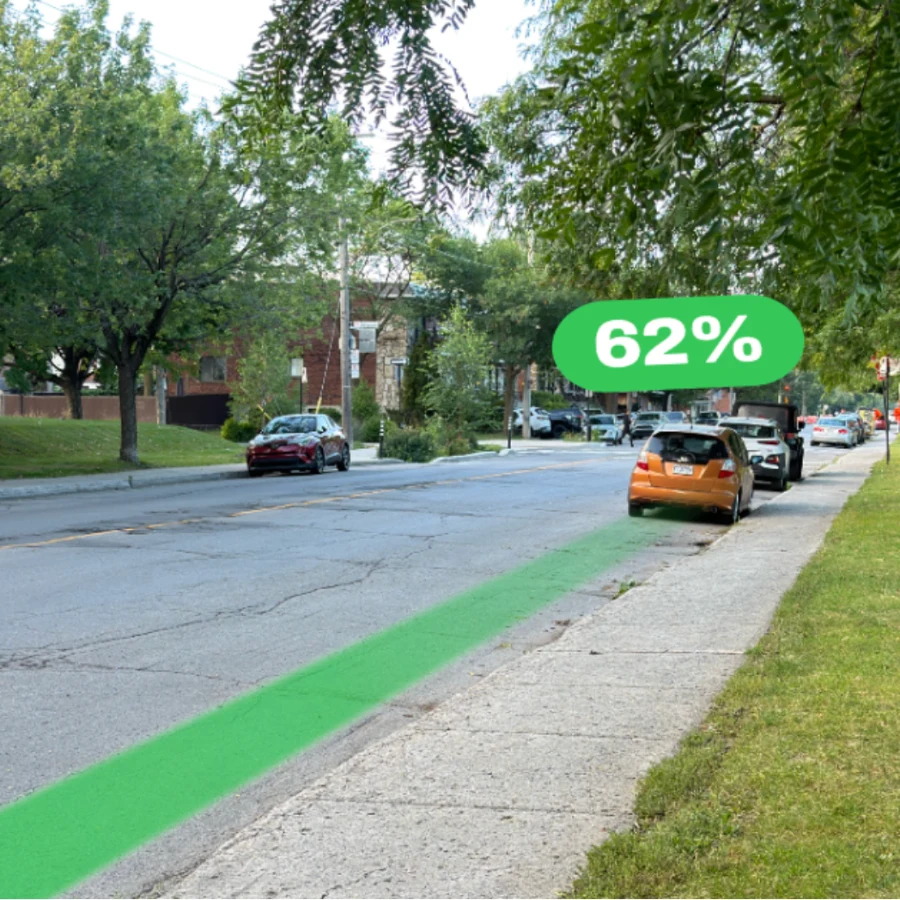
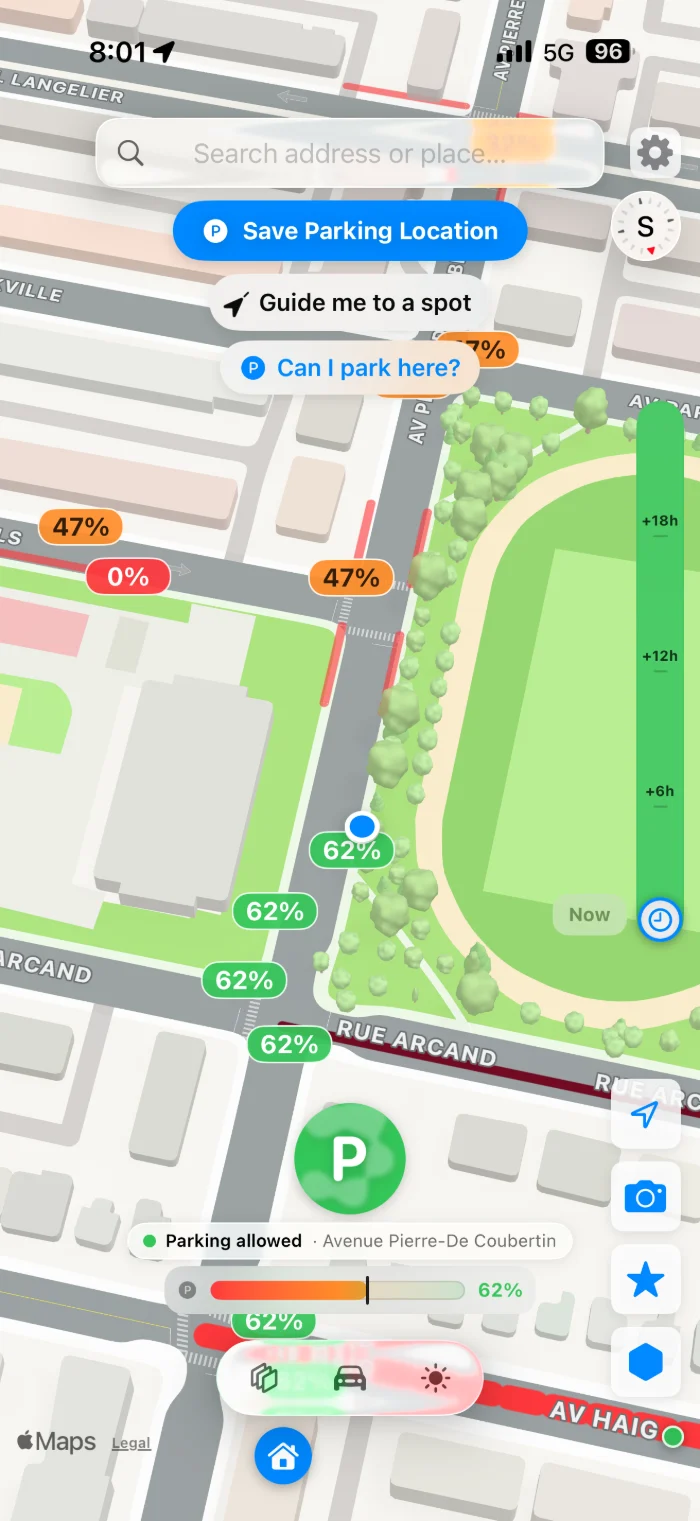
Every street shows a number: your chance of finding a spot there right now. Red means no chance, green means a good one, and the colours in between fill the gap, so you can read a whole route at a glance.
- A clear percentage for every street, not just a colour
- Red means no chance, green means a good one, amber sits in between
- Fire hydrants marked on the map, so you don’t park across one
- Tap any street to see the number and the rule behind it
The circle on the map is a photograph of that same street, taken minutes after the reading.
02
The rules, painted on the street
Parallel highlights only what stands in your way: streets where parking is prohibited, streets that need a permit, the fire hydrants you cannot park across, and the bus stops where stopping is prohibited. It is on by default, so the map tells you where not to bother before you slow down.
- Red for prohibited, yellow for permit-only, nothing where neither applies
- Drawn along both sides of the street, separately
03
Turn the clock forward
Drag the time slider and the whole map re-colours for that moment. The block that's legal when you park is not always legal when you come back, and this is the screen that keeps the ticket off the windshield.
- Preview any hour up to a day ahead
- The rules on the signs are checked for that future hour too, not just how busy it is
- One tap on "Now" to come back
04
Paid poles, and whether they are taken
Paid parking spots, right on the map, each showing the chance it is free. When free street parking is full, the paid spot two streets over often is not, and you can see that before doing another lap.
- Green means a good chance the spot is free, amber is about 50 / 50, red means don’t bother
- Every paid spot on the street, across the city
- Shown next to the free-street colours, so you can weigh a paid spot now against a free one later
05
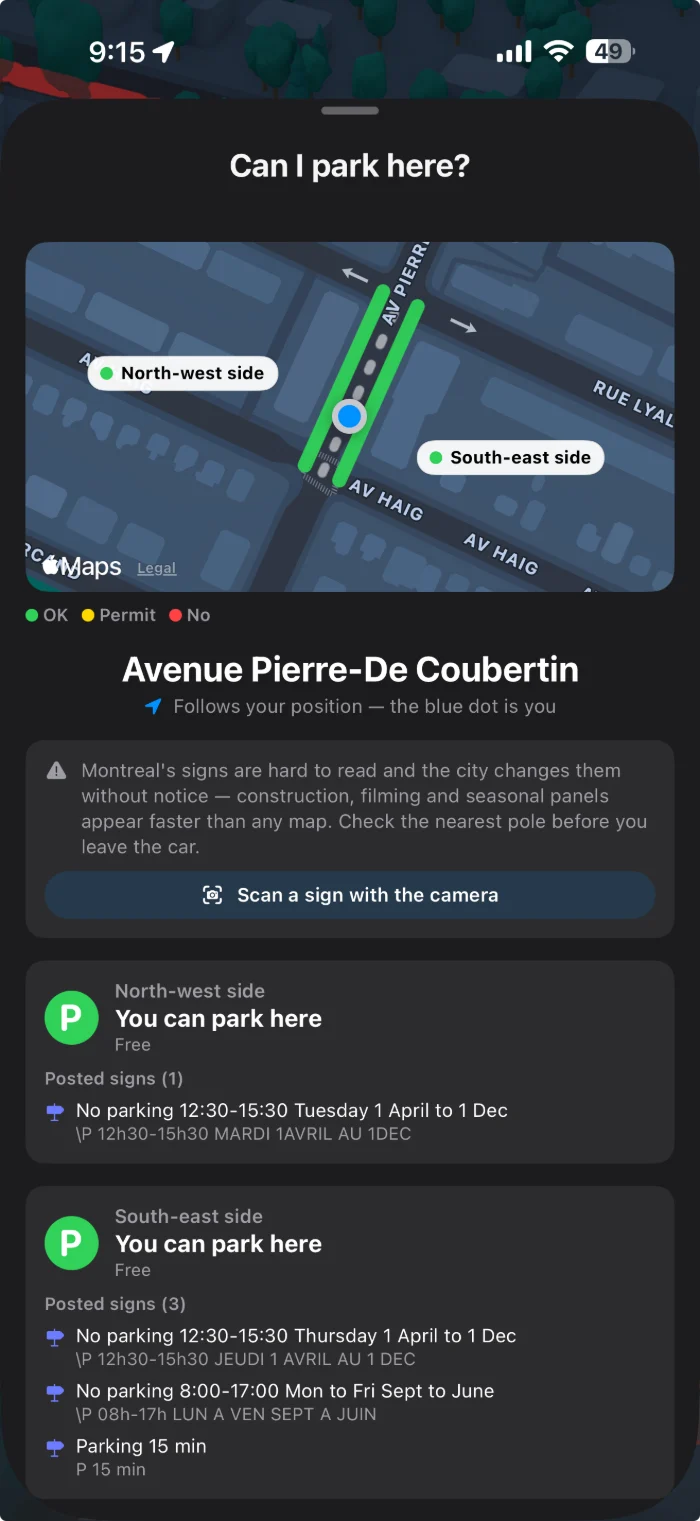
Can I park here?
One tap on the map and Parallel answers for the exact spot you're standing in: both sides of the street, separately, because in Montréal they rarely agree. Every panel on the pole is decoded into one plain sentence, in the language you read.
- Follows your position, so the blue dot is you
- Each side of the street gets its own answer
- Every posted sign listed underneath, original French text included
- How often cars are towed from this block, how often they are broken into, and how often something is hit here, so leaving it there is a decision rather than a guess
06
The P answers before you read anything
One symbol under your thumb, coloured for the exact spot you are on: green when parking is allowed, amber when it is restricted, red when it is prohibited. It changes colour as you move and as the time changes, so checking takes a glance, not a paragraph.
- Green, amber or red for the spot you are standing on
- Changes colour as you move and as the posted hours change
- The rule spelled out underneath, when you want the detail
07
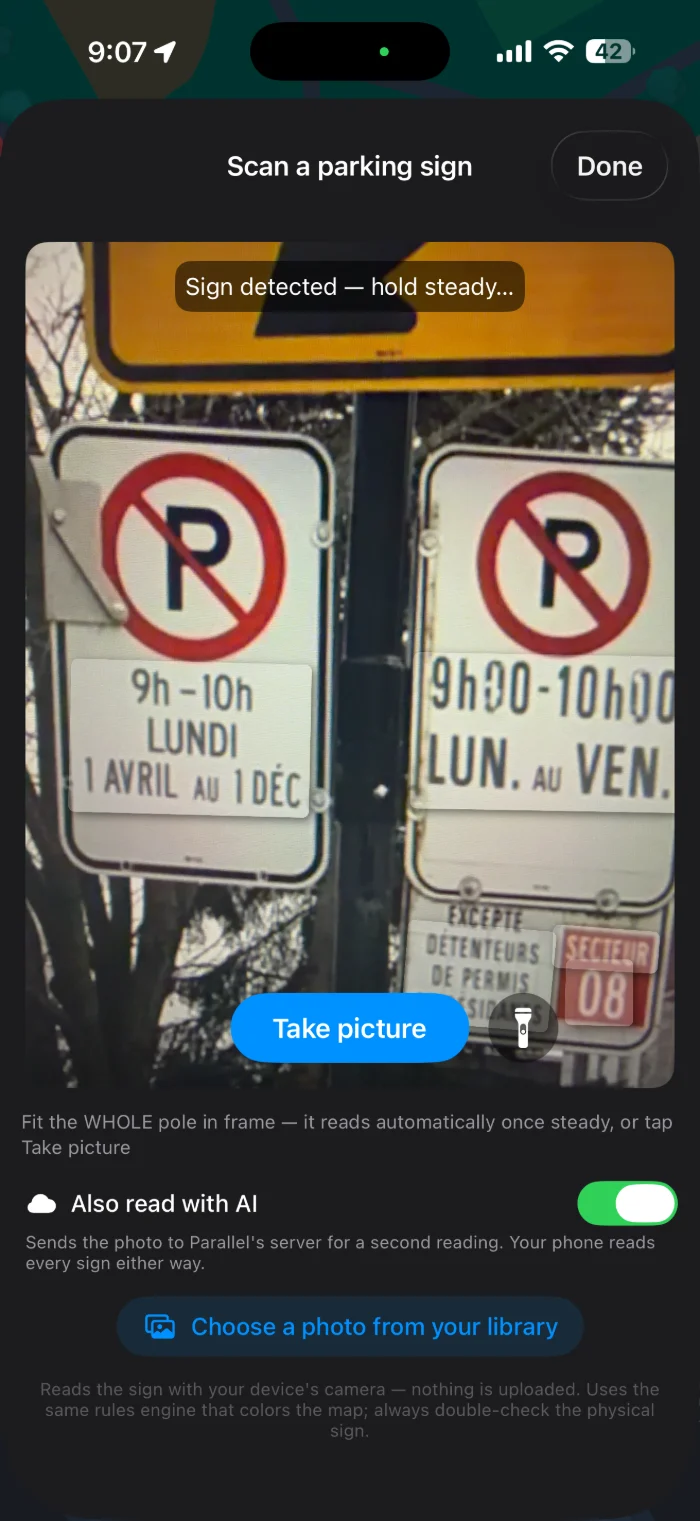
Scan the pole with the camera
When a pole carries four panels stacked in two languages, point the camera at all of it. Parallel reads the whole stack on the device and turns it into a yes or a no, using the same brain that colours the map.
- Reads automatically once the camera is steady
- Handles French, English and mixed poles
- Optional second reading with AI: off if you prefer nothing leaves the phone
08
Know if enforcement is nearby
Drivers report an enforcement car when they see one, and everyone within a few kilometres sees it for the next 45 minutes. One glance tells you whether the block is calm, worth watching, or being checked right now.
- Green when nothing has been reported, amber when a car was seen nearby in the last 45 minutes, red when one was seen within 1.5 km in the last 15
- Reports are anonymous: no account, no name, no exact car, and the spot is rounded to the block
- One tap to report, and it expires on its own so old sightings never mislead anyone
09
Parallel Plus FeatureEvery sign pole on the street, mapped
The poles sit on the map where they actually stand, each one carrying the rules posted on it. You read the whole street from the car instead of walking pole to pole to work out where a restriction starts and where it ends.
- Every pole on screen, with the rules posted on it
- See where a restriction begins and ends without walking it
- Pay stations and garages appear on the same map
- Touch any street to pull up its own information
10
Parallel Plus FeatureThe whole neighbourhood, in colour
Zoom out as far as you like and the whole neighbourhood is painted with your chances right now. You see a wall of red three blocks ahead and know parking there will be hard, early enough to pick another street or aim for the green pocket two blocks over. The free app keeps you around where you are; Plus takes the leash off.
- Pinch out to a whole borough or drag across the island, with no limit on how far you go
- Each side of every street gets its own colour, because the two sides can differ
- A colour view of the whole area, so a hard neighbourhood is obvious before you enter it
- Readable at a glance from the driver’s seat, and while you circle your saved car stays on screen
11
Parallel Plus FeatureParking forecast
How the city fills up, hour by hour, next to the pattern for your own neighbourhood. Home streets fill at night and empty at midday; shopping streets do the opposite, and knowing which one you're heading into is most of the decision.
- Where the city is heading over the next few hours
- Home streets and shopping streets, charted side by side
- Updated through the day as the city changes
12
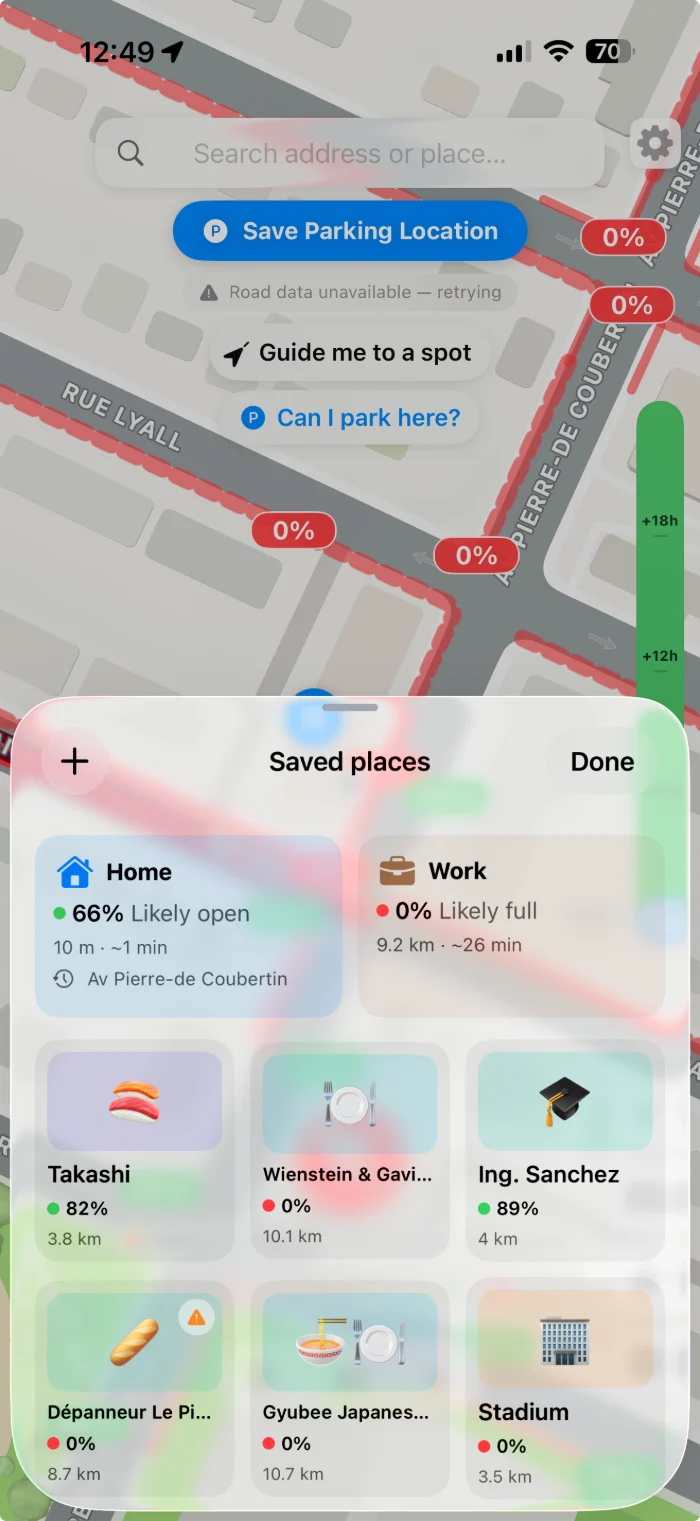
Parallel Plus FeatureYour favourite places, already checked
Home, work, the sushi place, the rink. Save the addresses you drive to and Parallel keeps a live number for each one, so before you put a coat on you already know whether tonight is a park-out-front night or a walk-two-blocks night.
- A live chance for every saved place, updated as the hours pass
- Name them what you actually call them, with your own icon
- Tap one to open it on the map, with its rules and the best time to arrive
13
Parallel Plus FeatureMap layers
Make the map yours. Everything the street is hiding sits on its own switch: pay stations, construction, lots, sign poles, EV chargers, speed and red-light cameras, vehicle theft areas, park & ride. You build the view you actually need and hide the rest. A cyclist, a delivery driver and someone parking outside their own house all want a different map; Parallel remembers whichever one you set.
- Every layer independent, so you switch on only what matters to you
- Focused modes: just-freed spots, active street spots, or restricted streets only
- Map, satellite or hybrid, and your choices are remembered next time
Parallel Plus Feature
Built for the last two minutes of the drive.
On CarPlay your chances ride under the turn directions: a percentage on every street, the rule in the corner, one dial for the street you're on.
No guesswork.
Ten years of work sit under the map: an engine that knows every block in the city. It doesn't guess and it doesn't promise. It estimates, carefully and honestly.
Available in November 2026 for pre-order
Never take your eyes off your vehicle.
The Parallel Parking Token is a slim smart token you buy once and leave in the car. It reports only to the Parallel app, so you can keep an eye on your car if something happens to it.
- The token is yours forever after one purchase. Live monitoring is a monthly fee, which covers the wireless connection it needs to report in
- No separate app and no account: the token appears inside Parallel
- Slides into the glovebox or under a seat, nothing to wire in
- Reports every 15 to 20 minutes: the token checks in on a regular interval, so the position in the app is never more than a few minutes old
- Island of Montréal only: the token can only monitor your vehicle on the island. Leave it and coverage pauses until you’re back
Pricing to be announced. Available only on the Island of Montréal.
Moved without you
If the car leaves the spot you parked it in, the app says so, with where it went and when.
Started without you
The engine turning over when you are not in the driver seat is worth knowing about immediately.
Towed
The most expensive thing that can happen to a parked car in this city, and the one you usually find out about last.
Where you left it
Open the app and see the car where you parked it. No wondering whether it is still there, and no wandering the block trying to remember which street you took.
Anonymous by design
The token belongs to nobody until you scan it.
- Not tied to your name, your car or your phone: even if stolen or misplaced, there is nothing in the token that identifies any of them
- Every token carries its own QR code, and only the person who scans it can monitor it
- One owner, one place: only a physical scan claims a token, and one already being monitored cannot be added anywhere else
- If the Parallel app on your phone notices a token travelling with you that you never added, it tells you
- No trip history: what the token reports lives on your phone only
- Unpair it and it goes silent at once, so selling the car or passing it on leaks nothing
Certified
The token is certified for sale and radio use in Canada, the United States and the European Union, and meets the RoHS, REACH and WEEE requirements for materials and recycling.
Coming Soon
An API for everyone who parks for a living.
The odds behind the app are one endpoint away. Ask for a street, a coordinate or a whole borough, at any hour, and get back the same numbers the map is painted with.
Delivery and courier fleets
Route to the door with the best chance of a legal stop, and stop paying for the tickets your drivers take on faith.
Trades and home services
A plumber with a van needs a spot for two hours, not two minutes. Book the appointment window where one actually exists.
Navigation and mobility apps
Turn-by-turn ends at the address. Add the part after it, so your users know where the car goes.
Cities and researchers
How full each side of each street gets, hour by hour.
Free to start. Pay only for more.
Free covers the parking rules for the street you're on, forever. Plus opens the whole city. Pro adds live odds everywhere for drivers who are on the road all day.
Parallel Free
$0
Free forever, no account and no ads
It answers the question that matters most: can I park on this street, right now?
- The parking rules for the street you're on, each side separately
- “Can I park here?”: a straight answer for the exact spot you're standing on
- Parking sticker mode: streets in your own permit zone count as parkable
- The sign scanner: point your camera at a pole and Parallel reads it for you
- Your parked car, with timers and a reminder before the rules change
- Your odds of finding a spot where the map is centred
- The parking rules for the street you're on, each side separately
- “Can I park here?”: a straight answer for the exact spot you're standing on
- Parking sticker mode: streets in your own permit zone count as parkable
- The sign scanner: point your camera at a pole and Parallel reads it for you
- Your parked car, with timers and a reminder before the rules change
- 5 AI sign readings a week, for a second opinion on hard-to-read signs
- Enforcement sightings: see them and report an agent
- Home Screen widgets
Where Free stops
- The map shows about 110 m around you. Past that it's fogged.
- Move the map up to 50 m from where you are, and zoom out only as far as the opening view.
- 5 destination searches a week
- Two saved places: home and work
- Live odds for 5 minutes near you when you open the app, and at the start and end of a trip. Typical odds the rest of the time.
- AI street readings come with Plus and Pro
Parallel Plus
$3.99 CAD / month
or $34.99 CAD / year · save 27%
For the everyday driver: the whole city, every feature, and live odds when you're about to park.
Everything in Free, without its limits
- The whole map: move and zoom anywhere in the city
- Unlimited destination searches
- As many saved places as you like, each with its odds ready
Plus features
- CarPlay, with your odds right under the turn directions
- The parking-chance map: the whole city coloured block by block
- Parking forecast for the next 12 hours
- How each area changes through the day
- Street Parking Pulse: how busy each area feels right now
- Just-freed spots, and a way to share yours
- Map layers: pay stations, lots, EV chargers, cameras, transit parking
- Recent searches
Live odds and AI
- 120 live windows a month, 5 minutes each, that open on their own as you arrive, look for a spot or ask about one
- 50 AI sign readings a month
- 20 AI street readings a month
Parallel Pro
$29.99 CAD / month
or $249.99 CAD / year · save 31%
For drivers on the road all day who need the app the whole time.
Everything in Plus, and more of what counts
- Live odds everywhere, all the time, for up to 40 hours a month. No windows to count
- Only time the app is showing live odds counts, so a phone in your pocket uses nothing
- After 40 hours, Pro works like Plus until the 1st
- 300 AI sign readings a month
- 100 AI street readings a month
- Settings shows the hours you have left
What the limits mean
When a limit runs out, nothing stops working. Live odds switch to typical odds, and the sign scanner keeps reading signs on your phone.
Live odds and typical odds
Live odds are worked out in real time, the moment you open the app. Typical odds show what that street usually looks like at that hour on that day. Both are good guides; live odds are simply the sharper of the two.
Live windows (Plus)
A live window is 5 minutes of live odds. They open on their own when you need them most: as you arrive, while you look for a spot, or when you ask about one. Opening the app and starting a trip never use one.
Pro's 40 hours
Only time the app is actually showing live odds counts, so a phone in your pocket uses nothing. 40 hours is about 2 hours every working day.
When limits reset
Plus and Pro start again on the 1st of each month. Free's AI sign readings start again every Monday.
Prices in Canadian dollars. Plus and Pro are auto-renewing App Store subscriptions; cancel any time in Settings › Apple Account › Subscriptions. No account, no ads.
The honest answers.
Is this AI?
The numbers are not. The odds come from real, live data, recomputed around the clock, not generated or guessed.
There is AI in the app, and it sits in one place: helping you make sense of what's already there. Reading the stack of signs on a pole and turning it into one plain answer, for instance. It explains the data. It never produces the odds.
How does Parallel actually know the odds?
That part we keep. What we will tell you: nothing invented, just an honest number, recalculated constantly for every block in the city.
Where does the city parking regulations and on-street paid parking data come from?
Montréal publishes its street-sign and parking-regulation data openly, as does the Agence de mobilité durable for on-street parking. That information is free and it belongs to everyone, and Parallel will never charge you for it. Parallel is also featured in the city’s own open data showcase.
Does it cover paid, residential and business zones?
Yes, all of them. Metered spots, residential permit zones, business zones: if a rule is posted on the pole, Parallel already knows it.
What's the difference between the odds and the parking rules?
They're two different things working together. The odds tell you where you're most likely to find a spot right now. The on-street rules tell you whether it's actually legal to park there, so you don't end up with a ticket.
How reliable are the posted rules?
We pull rule data directly from the city. In practice it isn't always complete or current, but we include it anyway, because knowing where you're legally allowed to park matters. Always glance at the actual signs before you walk away.
Does it work during winter and snow removal?
Yes, winter was built in from day one. Snow bans, street cleaning times and permit zones all change your chances the moment the rules do.
Is my location tracked or stored?
No. Parallel uses your location only while the app is open, and it's never linked back to you. See the privacy policy for the full details.
If Parallel is free, why is there a paid plan?
It's free. Parking belongs to everyone, and the core experience always will be: no account, no paywall for the core experience.
There are paid plans, Plus and Pro, because cloud and server costs are not free. We recompute every block in the city around the clock, and that runs on machines we have to pay for, plus the map data, the storage and the bandwidth behind every screen you open. We could have covered it with ads or by selling data. We'd rather not. So the plans exist for people who want to support the work, and those subscriptions are what keeps Parallel free for everyone who can't pay for it.
What do Plus and Pro add?
Plus opens the whole city: the full map, CarPlay, the parking-chance map, the parking forecast, Street Parking Pulse, just-freed spots, map layers and recent searches, with 120 windows of live odds a month. Everything marked Parallel Plus Feature above comes with it.
Pro adds live odds everywhere, all the time, for up to 40 hours a month, for drivers who are on the road all day. Everything else stays free: the rules for the street you're on, asking whether you can park where you're standing, reading a sign with the camera, and your parked car with its timers.
Stop circling the block.
Montréal first, borough by borough. Now on the App Store.
Get in touch
Say hello
Bug reports, ideas, or nothing in particular.